SCE Price Action SuiteThis is an indicator designed to use past market data to mark key price action levels as well as provide a different kind of insight. There are 8 different features in the script that users can turn on and off. This description will go in depth on all 8 with chart examples.
#1 Absorption Zones
I defined Absorption Zones as follows.
//----------------------------------------------
//---------------Absorption---------------------
//----------------------------------------------
box absorptionBox = na
absorptionBar = ta.highest(bodySize, absorptionLkb)
bsab = ta.barssince(bool(ta.change(absorptionBar)))
if bsab == 0 and upBar and showAbsorption
absorptionBox := box.new(left = bar_index - 1, top = close, right = bar_index + az_strcuture, bottom = open, border_color = color.rgb(0, 80, 75), border_width = boxLineSize, bgcolor = color.rgb(0, 80, 75))
absorptionBox
else if bsab == 0 and downBar and showAbsorption
absorptionBox := box.new(left = bar_index - 1, top = close, right = bar_index + az_strcuture, bottom = open, border_color = color.rgb(105, 15, 15), border_width = boxLineSize, bgcolor = color.rgb(105, 15, 15))
absorptionBox
What this means is that absorption bars are defined as the bars with the largest bodies over a selected lookback period. Those large bodies represent areas where price may react. I was inspired by the concept of a Fair Value Gap for this concept. In that body price may enter to be a point of support or resistance, market participants get “absorbed” in the area so price can continue in whichever direction.
#2 Candle Wick Theory/Strategy
I defined Candle Wick Theory/Strategy as follows.
//----------------------------------------------
//---------------Candle Wick--------------------
//----------------------------------------------
highWick = upBar ? high - close : downBar ? high - open : na
lowWick = upBar ? open - low : downBar ? close - low : na
upWick = upBar ? close + highWick : downBar ? open + highWick : na
downWick = upBar ? open - lowWick : downBar ? close - lowWick : na
downDelivery = upBar and downBar and high > upWick and highWick > lowWick and totalSize > totalSize and barstate.isconfirmed and session.ismarket
upDelivery = downBar and upBar and low < downWick and highWick < lowWick and totalSize > totalSize and barstate.isconfirmed and session.ismarket
line lG = na
line lE = na
line lR = na
bodyMidpoint = math.abs(body) / 2
upWickMidpoint = math.abs(upWickSize) / 2
downWickkMidpoint = math.abs(downWickSize) / 2
if upDelivery and showCdTheory
cpE = chart.point.new(time, bar_index - 1, downWickkMidpoint)
cpE2 = chart.point.new(time, bar_index + bl, downWickkMidpoint)
cpG = chart.point.new(time, bar_index + bl, downWickkMidpoint * (1 + tp))
cpR = chart.point.new(time, bar_index + bl, downWickkMidpoint * (1 - sl))
cpG1 = chart.point.new(time, bar_index - 1, downWickkMidpoint * (1 + tp))
cpR1 = chart.point.new(time, bar_index - 1, downWickkMidpoint * (1 - sl))
lG := line.new(cpG1, cpG, xloc.bar_index, extend.none, color.green, line.style_solid, 1)
lE := line.new(cpE, cpE2, xloc.bar_index, extend.none, color.white, line.style_solid, 1)
lR := line.new(cpR1, cpR, xloc.bar_index, extend.none, color.red, line.style_solid, 1)
lR
else if downDelivery and showCdTheory
cpE = chart.point.new(time, bar_index - 1, upWickMidpoint)
cpE2 = chart.point.new(time, bar_index + bl, upWickMidpoint)
cpG = chart.point.new(time, bar_index + bl, upWickMidpoint * (1 - tp))
cpR = chart.point.new(time, bar_index + bl, upWickMidpoint * (1 + sl))
cpG1 = chart.point.new(time, bar_index - 1, upWickMidpoint * (1 - tp))
cpR1 = chart.point.new(time, bar_index - 1, upWickMidpoint * (1 + sl))
lG := line.new(cpG1, cpG, xloc.bar_index, extend.none, color.green, line.style_solid, 1)
lE := line.new(cpE, cpE2, xloc.bar_index, extend.none, color.white, line.style_solid, 1)
lR := line.new(cpR1, cpR, xloc.bar_index, extend.none, color.red, line.style_solid, 1)
lR
First I get the size of the wicks for the top and bottoms of the candles. This depends on if the bar is red or green. If the bar is green the wick is the high minus the close, if red the high minus the open, and so on. Next, the script defines the upper and lower bounds of the wicks for further comparison. If the candle is green, it's the open price minus the bottom wick. If the candle is red, it's the close price minus the bottom wick, and so on. Next we have the condition for when this strategy is present.
Down delivery:
Occurs when the previous candle is green, the current candle is red, and:
The high of the current candle is above the upper wick of the previous candle.
The size of the current candle's top wick is greater than its bottom wick.
The total size of the previous candle is greater than the total size of the current candle.
The current bar is confirmed (barstate.isconfirmed).
The session is during market hours (session.ismarket).
Up delivery:
Occurs when the previous candle is red, the current candle is green, and:
The low of the current candle is below the lower wick of the previous candle.
The size of the current candle's bottom wick is greater than its top wick.
The total size of the previous candle is greater than the total size of the current candle.
The current bar is confirmed.
The session is during market hours
Then risk is plotted from the percentage that users can input from an ideal entry spot.
#3 Candle Size Theory
I defined Candle Size Theory as follows.
//----------------------------------------------
//---------------Candle displacement------------
//----------------------------------------------
line lECD = na
notableDown = bodySize > bodySize * candle_size_sensitivity and downBar and session.ismarket and barstate.isconfirmed
notableUp = bodySize > bodySize * candle_size_sensitivity and upBar and session.ismarket and barstate.isconfirmed
if notableUp and showCdSizeTheory
cpE = chart.point.new(time, bar_index - 1, close)
cpE2 = chart.point.new(time, bar_index + bl_strcuture, close)
lECD := line.new(cpE, cpE2, xloc.bar_index, extend.none, color.rgb(0, 80, 75), line.style_solid, 3)
lECD
else if notableDown and showCdSizeTheory
cpE = chart.point.new(time, bar_index - 1, close)
cpE2 = chart.point.new(time, bar_index + bl_strcuture, close)
lECD := line.new(cpE, cpE2, xloc.bar_index, extend.none, color.rgb(105, 15, 15), line.style_solid, 3)
lECD
This plots candles that are “notable” or out of the ordinary. Candles that are larger than the last by a value users get to specify. These candles' highs or lows, if they are green or red, act as levels for support or resistance.
#4 Candle Structure Theory
I defined Candle Structure Theory as follows.
//----------------------------------------------
//---------------Structure----------------------
//----------------------------------------------
breakDownStructure = low < low and low < low and high > high and upBar and downBar and upBar and downBar and session.ismarket and barstate.isconfirmed
breakUpStructure = low > low and low > low and high < high and downBar and upBar and downBar and upBar and session.ismarket and barstate.isconfirmed
if breakUpStructure and showStructureTheory
cpE = chart.point.new(time, bar_index - 1, close)
cpE2 = chart.point.new(time, bar_index + bl_strcuture, close)
lE := line.new(cpE, cpE2, xloc.bar_index, extend.none, color.teal, line.style_solid, 3)
lE
else if breakDownStructure and showStructureTheory
cpE = chart.point.new(time, bar_index - 1, open)
cpE2 = chart.point.new(time, bar_index + bl_strcuture, open)
lE := line.new(cpE, cpE2, xloc.bar_index, extend.none, color.red, line.style_solid, 3)
lE
It is a series of candles to create a notable event. 2 lower lows in a row, a lower high, then green bar, red bar, green bar is a structure for a breakdown. 2 higher lows in a row, a higher high, red bar, green bar, red bar for a break up.
#5 Candle Swing Structure Theory
I defined Candle Swing Structure Theory as follows.
//----------------------------------------------
//---------------Swing Structure----------------
//----------------------------------------------
line htb = na
line ltb = na
if totalSize * swing_struct_sense < totalSize and upBar and downBar and high > high and showSwingSturcture and session.ismarket and barstate.isconfirmed
cpS = chart.point.new(time, bar_index - 1, high)
cpE = chart.point.new(time, bar_index + bl_strcuture, high)
htb := line.new(cpS, cpE, xloc.bar_index, color = color.red, style = line.style_dashed)
htb
else if totalSize * swing_struct_sense < totalSize and downBar and upBar and low > low and showSwingSturcture and session.ismarket and barstate.isconfirmed
cpS = chart.point.new(time, bar_index - 1, low)
cpE = chart.point.new(time, bar_index + bl_strcuture, low)
ltb := line.new(cpS, cpE, xloc.bar_index, color = color.teal, style = line.style_dashed)
ltb
A bearish swing structure is defined as the last candle’s total size, times a scalar that the user can input, is less than the current candles. Like a size imbalance. The last bar must be green and this one red. The last high should also be less than this high. For a bullish swing structure the same size imbalance must be present, but we need a red bar then a green bar, and the last low higher than the current low.
#6 Fractal Boxes
I define the Fractal Boxes as follows
//----------------------------------------------
//---------------Fractal Boxes------------------
//----------------------------------------------
box b = na
int indexx = na
if bar_index % (n * 2) == 0 and session.ismarket and showBoxes
b := box.new(left = bar_index, top = topBox, right = bar_index + n, bottom = bottomBox, border_color = color.rgb(105, 15, 15), border_width = boxLineSize, bgcolor = na)
indexx := bar_index + 1
indexx
The idea of this strategy is that the market is fractal. It is considered impossible to be able to tell apart two different time frames from just the chart. So inside the chart there are many many breakouts and breakdowns happening as price bounces around. The boxes are there to give you the view from your timeframe if the market is in a range from a time frame that would be higher than it. Like if we are inside what a larger time frame candle’s range. If we break out or down from this, we might be able to trade it. Users can specify a lookback period and the box is that period’s, as an interval, high and low. I say as an interval because it is plotted every n * 2 bars. So we get a box, price moves, then a new box.
#7 Potential Move Width
I define the Potential Move Width as follows
//----------------------------------------------
//---------------Move width---------------------
//----------------------------------------------
velocity = V(n)
line lC = na
line l = na
line l2 = na
line l3 = na
line l4 = na
line l5 = na
line l6 = na
line l7 = na
line l8 = na
line lGFractal = na
line lRFractal = na
cp2 = chart.point.new(time, bar_index + n, close + velocity)
cp3 = chart.point.new(time, bar_index + n, close - velocity)
cp4 = chart.point.new(time, bar_index + n, close + velocity * 5)
cp5 = chart.point.new(time, bar_index + n, close - velocity * 5)
cp6 = chart.point.new(time, bar_index + n, close + velocity * 10)
cp7 = chart.point.new(time, bar_index + n, close - velocity * 10)
cp8 = chart.point.new(time, bar_index + n, close + velocity * 15)
cp9 = chart.point.new(time, bar_index + n, close - velocity * 15)
cpG = chart.point.new(time, bar_index + n, close + R)
cpR = chart.point.new(time, bar_index + n, close - R)
if ((bar_index + n) * 2 - bar_index) % n == 0 and session.ismarket and barstate.isconfirmed and showPredictionWidtn
cp = chart.point.new(time, bar_index, close)
cpG1 = chart.point.new(time, bar_index, close + R)
cpR1 = chart.point.new(time, bar_index, close - R)
l := line.new(cp, cp2, xloc.bar_index, extend.none, color.aqua, line.style_solid, 1)
l2 := line.new(cp, cp3, xloc.bar_index, extend.none, color.aqua, line.style_solid, 1)
l3 := line.new(cp, cp4, xloc.bar_index, extend.none, color.red, line.style_solid, 1)
l4 := line.new(cp, cp5, xloc.bar_index, extend.none, color.red, line.style_solid, 1)
l5 := line.new(cp, cp6, xloc.bar_index, extend.none, color.teal, line.style_solid, 1)
l6 := line.new(cp, cp7, xloc.bar_index, extend.none, color.teal, line.style_solid, 1)
l7 := line.new(cp, cp8, xloc.bar_index, extend.none, color.blue, line.style_solid, 1)
l8 := line.new(cp, cp9, xloc.bar_index, extend.none, color.blue, line.style_solid, 1)
l8
By using the past n bar’s velocity, or directional speed, every n * 2 bars. I can use it to scale the close value and get an estimate for how wide the next moves might be.
#8 Linear regression
//----------------------------------------------
//---------------Linear Regression--------------
//----------------------------------------------
lr = showLR ? ta.linreg(close, n, 0) : na
plot(lr, 'Linear Regression', color.blue)
I used TradingView’s built in linear regression to not reinvent the wheel. This is present to see past market strength of weakness from a different perspective.
User input
Users can control a lot about this script. For the strategy based plots you can enter what you want the risk to be in percentages. So the default 0.01 is 1%. You can also control how far forward the line goes.
Look back at where it is needed as well as line width for the Fractal Boxes are controllable. Also users can check on and off what they would like to see on the charts.
No indicator is 100% reliable, do not follow this one blindly. I encourage traders to make their own decisions and not trade solely based on technical indicators. I encourage constructive criticism in the comments below. Thank you.
在脚本中搜索"fair value gap"

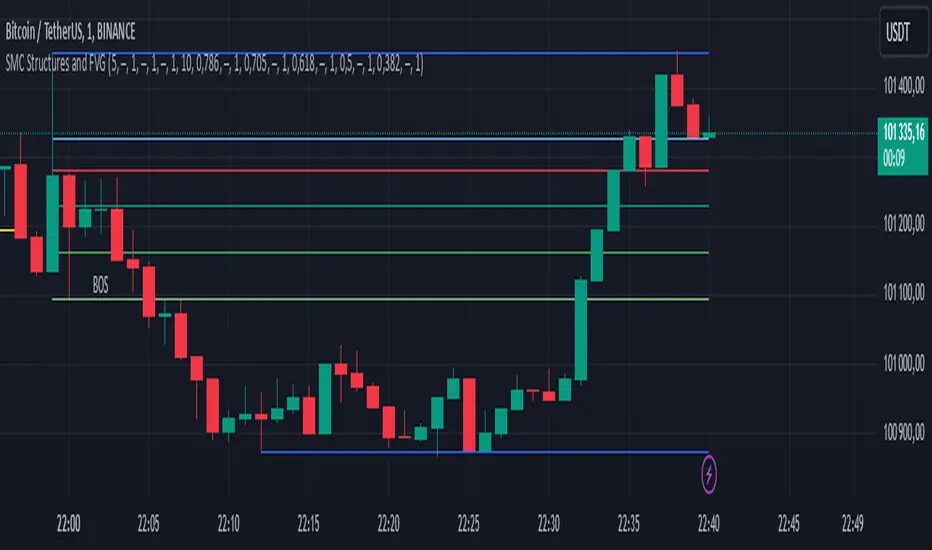
SMC Structures and FVGThe SMC Structures and FVG indicator allows the user to easily identify trend continuations (Break Of Structure) or trend changes (CHange Of CHaracter) on any time frame. In addition, it display all FVG areas, whether they are bullish, bearish, or even mitigated.
Fair Value Gap :
The FVG process shows every bullish, bearish or even mitigated FVG liquidity area. When a FVG is fully mitigated it will directly be removed of the chart.
There is an history of FVG to show. By selecting specific number of FVG to show in the chart, the user can focus its analysis on lasts liquidity area.
Here's the rules for FVG color :
Green when it's a bullish FVG and has not been mitigated
Red when it's a bearish FVG and has not been mitigated
Gray when the bullish / bearish FVG has been mitigated
Removed when the FVG has been fully mitigated
Structures analysis:
The Structure process show BOS in grey lines and CHoCH in yellow lines. It shows to the user the lasts price action pattern.
The blue lines are the high value and the low value of the current structure.
Inversion GapsAn inverted fair value gap (FVG) occurs when candles start closing below a bullish FVG or above a bearish FVG and in this case, support FVGs become resistances and vice versa. This is a smart money concept introduced by ICT. While we a number of have indicators for FVGs, we don't have any for inversion FVGs. This indicator is just for that - it shows FVGs only after they're inverted.
The meat of it comes from being able to plot HTF inverted FVGs in LTF. In the above BTC chart, you can see M15 inverted FVGs plotted on M1 chart and you can see price respecting them. Mitigations can also be shown as lines (as you can see in the chart).
You can also setup alerts for formation and mitigation of such inversion FVGs.

TA Confluence Scanner v2.9 | Mint_Algo📘 TA Confluence Scanner
Introduction
The TA Confluence Scanner is a multi-factor trend system designed to filter market noise and identify high-probability trade setups. By combining adaptive algorithms (KAMA) with Price Action methodologies (SMC, Breakouts, Fractals), this indicator operates on the principle of Confluence : a signal is only valid when multiple independent tools agree on the direction.
Instead of relying on a single lagging indicator (like just MA fast and slow crossover), this script acts as a "Scanner," evaluating the market state through Volatility, Trend Structure, and Equilibrium.
───────────────────────────────────────────────────
Important Note
To make this "Plug & Play," I have included optimized presets in the settings for different timeframes (1m/15m-1h/4h-1D) and trading styles (Scalper, Intraday, Swing, Investor) tested on symbols:
FX:EURUSD
IG:NASDAQ
BITSTAMP:BTCUSD
BINANCE:ETHUSD
CAPITALCOM:US500
OANDA:XAUUSD
NASDAQ:AAPL
NASDAQ:TSLA
BUT default settings already include a good preset which excludes most of the noise and grabs the trend better (fewer entries, but quality is higher).
Check the presets at the bottom 👇
───────────────────────────────────────────────────
Core Features
Adaptive Trend Filter (KAMA): Adjusts to market volatility to distinguish between chop and true trends.
SMC Equilibrium (EQ) Fans: A three-tiered dynamic structure (Fast, Medium, Slow) for trailing stops and targets.
Confluence Counter: Visually displays the strength of a signal (e.g., "Strong 4/6") based on how many factors align.
Re-Entry Logic: Identifies low-risk entry points within an existing trend.
Automated S/R & Breakouts: Detects key pivot levels and structural breaks.
───────────────────────────────────────────────────
Settings & Components Breakdown
1. KAMA (Primary Trend Filter)
The backbone of the system. It calculates the Efficiency Ratio (ER) of price movement.
How it works: If the ER is high (strong trend), KAMA follows price closely. If ER is low (ranging), KAMA flattens out to prevent false signals.
Tuning:
Fast (ER ~100/5/60): For Scalping.
Smooth: Default settings are optimized for a balance between lag and noise reduction.
2. SMC Equilibrium (EQ Structure)
Based on the HL2 formula (High+Low / 2), this creates a "fan" of three lines:
EQ1 (Fast): The aggressive line. Used for early exits or scalping stops.
EQ2 (Medium): The baseline trend structure.
EQ3 (Slow): The major trend container. Used for position trading.
Usage: Use these lines to gauge how far price has deviated from its "fair value."
3. Breakout & Internal Trend
Lookback Period: Defines the range for a valid breakout. A lower lookback (e.g., 10) gives earlier signals but more noise; a higher lookback (e.g., 20-30) confirms significant structural breaks.
Internal Trend: A simplified SMA check to ensure immediate momentum aligns with the macro trend.
4. Signal Strength (The Confluence Meter)
The indicator counts active signals from: KAMA, Internal Trend, S/R, FVG, Breakout, and EQ.
Strong Signal: When the count hits your threshold (e.g., 4/6 ). This suggests a high-probability reversal or breakout.
Medium Signal (Triangles): These appear when the trend is active but not all filters align. These are excellent continuation/re-entry points.
───────────────────────────────────────────────────
How to Trade (Strategy Guide)
🎯 The Entry
Wait for a Strong Signal (Large Label). This confirms that volatility, structure, and momentum have aligned.
Conservative: Wait for the candle to close.
Aggressive: Enter on the breakout of the KAMA line.
🔄 Re-Entry & Continuation
Markets rarely move in a straight line.
Scenario: You missed the initial "Strong" entry, or you took profit and want to re-enter.
The Signal: Look for the small Triangles (Medium signals). These often appear after a pullback when price resumes the main trend.
Logic: If the main KAMA trend is still green/red, but the "Strong" signal isn't firing, a Triangle indicates a safe place to add to a position.
⚠️ Pyramiding & Risk Management (Advanced)
The EQ Lines (Fast/Medium/Slow) are designed for a tiered position management strategy:
Entry: Open position (e.g., 0.03 lots).
First Take Profit: When price extends far beyond EQ1 (Fast) , lock in partial profits.
Trailing Stop: Move your Stop Loss to trace the EQ2 (Medium) line.
Trend Riding: Hold the "Runner" portion of your position until price closes back under EQ3 (Slow) or the KAMA line.
Tip: Use William Fractals (Period 2) to pinpoint exact swing highs/lows for tightening stops.
───────────────────────────────────────────────────
Presets & Optimized Settings
To make this "Plug & Play," I have included optimized presets in the settings for different trading styles.
(If you don't see some parameters, that means they are turned off in trading mode)
⚡ SCALPER (1m - 5m)
KAMA:
ER: 100
Fast Length: 15
Slow Length: 30
FVG:
Size %: 0.01
Trend Detection:
Length: 20
Breakout:
Lookback Period: 10
S/R Detection:
Pivot Length: 10
Tolerance: 0.3
SMC EQ:
Default: 10
EQ1: 10
EQ2 (Main): 30
EQ3: 120
Signal Strength:
Strong: 4
Medium: 3
📊 INTRADAY (15m - 1H)
KAMA:
ER: 100
Fast Length: 5
Slow Length: 30
Trend Detection:
Length: 100
Breakout:
Lookback Period: 30
S/R Detection:
Pivot Length: 20
Tolerance: 0.5
SMC EQ:
Default: 10
EQ1: 10
EQ2 (Main): 40
EQ3: 80
Signal Strength:
Strong: 4
Medium: 3
📈 SWING (4H - 1D)
KAMA:
ER: 30
Fast Length: 4
Slow Length: 30
Trend Detection:
Length: 50
Breakout:
Lookback Period: 20
S/R Detection:
Pivot Length: 30
Tolerance: 0.7
SMC EQ:
Default: 10
EQ1: 10
EQ2: 50
EQ3 (Main): 60
Signal Strength:
Strong: 4
Medium: 3
💼 INVESTOR (4H - 1D+)
KAMA:
ER: 30
Fast Length: 5
Slow Length: 10
Trend Detection:
Length: 100
Breakout:
Lookback Period: 50
S/R Detection:
Pivot Length: 30
Tolerance: 0.7
SMC EQ:
Default: 10
EQ1: 10
EQ2: 50
EQ3 (Main): 100
Signal Strength:
Strong: 4
Medium: 3
───────────────────────────────────────────────────
Notes
FVG (Fair Value Gaps): Optional. Enable if you trade volatile assets like Crypto/Gold where imbalances are common.
Support/Resistance: The built-in Pivot system is optional. Disable it if you prefer drawing your own levels to keep the chart clean.
Recommended Pairing:
For best results, pair this with a momentum oscillator like RSI to detect the range regime of a trend. Or DI+ and DI- (when it crosses over each other, that means the "range of possible" regime change of a trend).
───────────────────────────────────────────────────
Disclaimer:
This tool is for informational purposes only. "Confluence" increases probability but does not guarantee results. Always manage your risk.

deKoder | Whale Prints [WP]deKoder | Whale Prints | Large Trade Orderflow Detection
This open-source indicator is a clean, precision tool for revealing hidden large-volume activity directly on your chart. By scanning ultra-low timeframes while you view higher ones, it projects statistically significant volume spikes as intuitive markers giving you a clear window into institutional orderflow without visually overwhelming the price action.
Key Features & Strengths
True Intra-Bar Detection | Monitors lower timeframes down to 1-second bars, catching aggressive block trades and absorption that occur within a single higher-TF candle.
Accurate Trade Levels | Markers are placed at the actual hl2 price of the aggressive lower-TF bar, providing a far more accurate estimate of where the large trade executed than typical mid-candle approximations.
Multiple Trades Per Bar | If several significant volume spikes occur inside one higher-TF candle, all qualifying levels are displayed individually – offering greater granularity and context.
Adaptive Thresholding | Uses higher-TF volume standard deviation (stable baseline) intelligently scaled to the lower timeframe, reducing noise in quiet markets while remaining sensitive to genuine outliers.
Clean Visual Hierarchy | Three tiers (Small 🞉 / Medium ⏣ / Large 🞊) with dynamic symbol size, line thickness, transparency, and user-definable bullish/bearish coloring based on LTF candle direction.
How to Use It as an Orderflow Tool
Large volume spikes often mark the footprints of institutional players. This indicator helps you read those footprints in real time.
Small (🞉) | Moderate excess volume: early interest, probing, or building positions.
Medium (⏣) | Strong spike: increasing conviction, potential momentum shift.
Large (🞊) | Extreme outlier: frequently climactic volume signalling exhaustion or major absorption.
Why Price Often Reverses at These Levels
Large players frequently place limit orders in areas rich with liquidity – commonly just beyond recent highs/lows where retail stop-losses cluster. When price sweeps those zones:
Stop hunts trigger a cascade of forced exits, creating liquidity for larger participants to fill their limit orders.
Breakout traders who entered on the move are trapped offside and become forced buyers/sellers when price reverses.
Institutions use this liquidity to execute large orders at favorable prices with minimal immediate market impact.
The result is aggressive volume at the extreme, followed by reversal as smart money finishes filling and price returns toward fair value. Clusters of medium/large markers at swing points are classic signs of this dynamic.
Practical Analysis Tips
Reversals/Absorption | Clusters of large markers at swing highs/lows (especially opposing-color spikes) signal potential turns – buyers or sellers stepping in aggressively.
Level Defense | Trades piling up at key support/resistance suggest institutions protecting or building positions.
Trapped Traders | Large spikes beyond range pivots followed by reversal back into the range often highlight trapped breakout traders who add fuel to a move when they are forced to liquidate their positions.
Use Offset (-3 to +3) to shift markers away from current price for clearer viewing.
Pro tip: Zoom into the lower TF occasionally to see how these projected levels align exactly with aggressive candles.
Recommended Pairings
This is designed as a pure orderflow overlay to be layered with your existing setup:
Support & Resistance (horizontals, pivots, Volume Profile POC/VAH/VAL)
Market Structure tools (swing points, order blocks, fair value gaps)
Trend filters (EMAs, SuperTrend, higher-TF bias)
Momentum oscillators for timing confluence
Best Suited For
Scalping & day trading (1–15 min charts with 5–30S lower TF)
Swing trading entries (1H–4H charts with 1–5 min lower TF)
High-liquidity markets: crypto perpetuals, forex majors, volatile stocks
Add this indicator to start seeing the hidden aggression driving price and expose the hidden edges beyond the noise.
☠ FR33FA11 | deKoder ☠
Released January 2025 | Open Source

ICT Pro [KTY]Hi, I'm Kim Thank You 👋
KTY = Kim Thank You (김땡큐)
【ICT Pro】📊
Essential ICT tools for Smart Money trading.
5 core features to identify institutional order flow and high-probability trade setups.
━━━━━━━━━━━━━━━━━━━━━━━━━━━━━━━
💡 NEW TO THIS INDICATOR?
Open Settings and hover over the (i) icon on each feature for detailed tooltips.
Check the 📚 User Guide section at the bottom of Settings for quick reference.
━━━━━━━━━━━━━━━━━━━━━━━━━━━━━━━
📊 FEATURES
━━━━━━━━━━━━━━━━━━━━━━━━━━━━━━━
✅ Order Block (OB)
Price zones where Smart Money executed large buy/sell orders, acting as strong support/resistance levels.
- Bullish OB: Last bearish candle before an up move → Support
- Bearish OB: Last bullish candle before a down move → Resistance
📈 Box Display Info
- Vol: Volume at OB formation
- (%): Upper/Lower volume balance ratio
- Closer to 100% = Balanced buy/sell
- Lower = Strong one-sided order flow → Stronger S/R zone
📍 OB Body Lines
- Dotted lines showing candle body position within OB
- Use for precise entry points
━━━━━━━━━━━━━━━━━━━━━━━━━━━━━━━
✅ Liquidity Zone
Areas where stop-loss orders are clustered around swing highs/lows, becoming targets for Smart Money.
- Buyside Liquidity: Stop-losses above highs where shorts get liquidated
- Sellside Liquidity: Stop-losses below lows where longs get liquidated
- Liquidity Sweep: Price hunts stops then reverses sharply
📈 Box Display Info
- (%): Relative size compared to recent volume
- Higher = More stop orders clustered
- More likely to be a major target for Smart Money
💡 Quick reversal after liquidity break = Reversal signal
━━━━━━━━━━━━━━━━━━━━━━━━━━━━━━━
✅ Fair Value Gap (FVG)
A gap created when price moves rapidly between 3 candles, where price tends to return to fill this zone.
- Bullish FVG: Forms during sharp rallies → Acts as support on pullbacks
- Bearish FVG: Forms during sharp drops → Acts as resistance on bounces
- CE (Consequent Encroachment): 50% level of FVG, key reaction level
📈 Box Display Info
- (%): Relative size compared to recent volume
- Higher = FVG formed by stronger move
- Acts as stronger S/R zone
💡 FVG overlapping with OB = Higher reliability
━━━━━━━━━━━━━━━━━━━━━━━━━━━━━━━
✅ Market Structure
Analyzes price swing highs/lows to identify current trend and reversal points.
- CHoCH (Change of Character): Trend reversal signal - first sign of direction change
- BOS (Break of Structure): Trend continuation signal - structure break in existing direction
⚙️ Structure Options
- INTERNAL: Short-term structure (fast reaction, more signals)
- EXTERNAL: Long-term structure (slower reaction, higher reliability)
- ALL: Display both internal + external structure
💡 CHoCH = Look for reversal | BOS = Trend continues
━━━━━━━━━━━━━━━━━━━━━━━━━━━━━━━
✅ Trend Candles
Candle colors change based on market structure (BOS/CHoCH) direction.
- Bullish Color: After bullish structure break
- Bearish Color: After bearish structure break
💡 Color change = Potential trend shift
💡 Quickly identify overall market direction at a glance
━━━━━━━━━━━━━━━━━━━━━━━━━━━━━━━
📈 HIGHER RELIABILITY SETUPS
━━━━━━━━━━━━━━━━━━━━━━━━━━━━━━━
- Higher timeframe = More reliable signals
- Multiple features pointing to same price zone
(e.g. OB + FVG overlap = Strong confluence)
- Trend Candles + Market Structure direction aligned
- Quick reversal after Liquidity sweep
━━━━━━━━━━━━━━━━━━━━━━━━━━━━━━━
💡 TRADING TIPS
━━━━━━━━━━━━━━━━━━━━━━━━━━━━━━━
1. Identify Liquidity targets first
2. Wait for price to reach OB or FVG zone
3. Confirm with Market Structure (CHoCH/BOS)
4. Enter at OB body lines or FVG CE level
5. Stop loss below/above the zone
━━━━━━━━━━━━━━━━━━━━━━━━━━━━━━━
⚠️ DISCLAIMER
This indicator is for educational purposes only.
Not financial advice. Always do your own research.
Past performance does not guarantee future results.

ICT Liquidity & OTE Engine - Real TimeICT Liquidity & OTE Engine - Real Time
This indicator is a comprehensive toolkit designed for traders utilizing Inner Circle Trader (ICT) concepts. It automates the identification of key structural liquidity pools (Buy Side & Sell Side Liquidity) and calculates real-time Optimal Trade Entry (OTE) levels, allowing you to react instantly to market structure shifts and liquidity sweeps.
Core Features
1. Dynamic Liquidity Pools (BSL / SSL) The script uses pivot high and low logic to identify significant swing points where stop losses and breakout orders typically reside.
BSL (Buy Side Liquidity): Green lines extending from Pivot Highs. These represent areas where short sellers have stops (buy stops).
SSL (Sell Side Liquidity): Red lines extending from Pivot Lows. These represent areas where long traders have stops (sell stops).
2. Real-Time "Sweep" Detection Unlike static support/resistance indicators, this script reacts to live price action.
Visual Feedback: When price "sweeps" or purges a liquidity level (breaks a BSL or SSL line), the line style automatically changes from solid to dotted and becomes semi-transparent.
Why this matters: This provides immediate visual confirmation that a "Stop Hunt" has occurred, often a precursor to a Smart Money reversal.
3. Optimal Trade Entry (OTE) 70.5% The indicator continuously tracks the highest high and lowest low over a definable lookback period (default 40 bars) to establish the current dealing range.
It plots the 70.5% Fibonacci retracement level, which is the classic ICT "Sweet Spot" for entries during a retracement.
This removes the need to manually draw and redraw Fib tools every time the range expands.
4. Bullish Fair Value Gap (FVG) Markers The script highlights specific bars that exhibit bullish displacement gaps, aiding in the identification of strong buying pressure or potential entries after a liquidity sweep.
How It Works
Pivots: It calculates pivots based on your user-defined Lookback input (default 20). A higher number finds longer-term swings; a lower number finds short-term scalping levels.
Liquidity Logic: Once a pivot is confirmed, a line is projected forward. If the current live High or Low breaches this line, the script detects the liquidity run and alters the line's appearance.
OTE Logic: (Highest High - Lowest Low) * 0.705. This dynamic calculation ensures the OTE level moves with the market structure in real-time.
How to Use
Identify the Sweep: Wait for price to run a SSL (Red Line) or BSL (Green Line). Watch for the line to turn dotted, indicating the liquidity has been taken.
Wait for Displacement: Look for a reaction away from the sweep (e.g., a sharp move up after taking SSL).
Find the Entry: Look for price to retrace to the plotted OTE 70.5% Line, ideally aligning with a marked FVG square, to position yourself in alignment with Smart Money.
Settings
Pivot Lookback: Adjusts the sensitivity of the liquidity lines (Default: 20).
Show BSL/SSL Lines: Toggles the liquidity pools on/off.
Show OTE Levels: Toggles the real-time Fibonacci level.
OTE Line Color: Customize the visual style of your entry level.

Impulse Move FVG TrackerThis script identifies strong directional impulse moves and automatically plots Fair Value Gaps (FVGs) only in locations that are contextually relevant to those moves. It tracks consecutive candle bodies to determine when a large move up or down has occurred, calculates the midpoint of that impulse, and then displays bullish FVGs above the midpoint after strong upward moves and bearish FVGs below the midpoint after strong downward moves. The script operates only within a user-selected, scrollable time-of-day window and allows full control over FVG colors, extension length, minimum impulse size, and how many of the most recent FVGs remain on the chart. It is designed to reduce noise by showing FVGs only where price displacement suggests meaningful imbalance rather than marking every gap indiscriminately.

True FVGs v2This script identifies and plots true Fair Value Gaps (FVGs) using a strict three-candle structure, distinguishing between two formation types while accounting for doji candles. It draws shaded boxes to represent untraded price imbalances, with Type A and Type B gaps defined by precise wick-to-body and body-to-body relationships that reflect institutional price displacement. The indicator allows the user to control how far each FVG extends and how many recent FVGs remain visible, keeping the chart clean and relevant. This is helpful because it highlights high-probability areas where price is likely to react, enabling more precise trade planning, entries, and risk management without visual clutter. It expands on the first script (True FVGs) and allows for a more controlled design fitting each trader's desires.

True FVGsThis script highlights 3-candle Fair Value Gaps (FVGs) on your chart, showing areas where price moved quickly and left potential gaps in market structure. Bullish FVGs are shown with green boxes and suggest possible support, while bearish FVGs are shown with red boxes and suggest possible resistance. It also includes doji candles—very small-bodied candles that indicate indecision—so these patterns are not missed. The script displays the most recent 5 FVGs, making it easy to spot recent potential areas where price may react.

Engulfing Breakout StructureEngulfing Breakout Structure (EBS)
" Identify High-Probability Market Structures, Not Just Patterns. "
The E ngulfing Breakout Structure (EBS) is a professional-grade analysis tool designed to filter market noise and identify the true origins of significant price movements. While standard Engulfing patterns occur frequently, many lead to "fakeouts" within a range. EBS solves this by treating an engulfing candle as a potential "structure" that is only validated once a decisive Break-away occurs.
How it Works: The EBS Logic
Unlike traditional indicators that plot signals immediately, EBS follows a strict confirmation process:
Structure Formation (Invisible): The script internally tracks "Candidate" engulfing candles.
Break-away Validation: The structure is only drawn on the chart after price aggressively breaks out of the engulfing range, accompanied by a Fair Value Gap (FVG).
Historical Anchoring: Once confirmed, the block is plotted back to its origin, highlighting the exact zone where the market imbalance was created.
Key Features
Break-away Filter: Eliminates low-probability signals by ensuring price has left the "zone of indecision."
Dynamic Structure Plotting: Automatically draws the supply/demand blocks that acted as the catalyst for the breakout.
Smart FVG Integration: Detects and highlights the gaps created during the breakout, providing additional confluence for entry.
EBS Break-away Confirmed: Triggered the moment a new structure is validated by a decisive price breakout. This alert signals that a new supply or demand zone has been established.
EBS Structure Tested (Mitigation): Triggered when price returns to touch a previously confirmed EBS block. This "Mitigation" often presents the highest risk-to-reward entry opportunity as it tests the origin of the breakout.
Trading Strategy
The Breakout (Aggressive): Enter as soon as the EBS block and FVG appear, following the momentum.
The Retest (Conservative): Wait for price to return and "mitigate" the EBS block. This retest of a confirmed breakout structure is a classic institutional entry pattern.

Auto Supply and Demand and ICT ExecutionsAuto Supply and Demand and ICT Executions is a professional-grade technical analysis suite designed to automate the visualization of institutional market structure and "Smart Money" execution signals. By combining automated Supply/Demand zoning with key ICT (Inner Circle Trader) concepts, this indicator provides a complete roadmap for identifying high-probability reversal and continuation setups on any timeframe.
Core Features:
Auto Supply & Demand Zones:
Automatically identifies and plots active Supply (Red) and Demand (Green) zones based on significant market structure pivots.
Persistent Logic: Zones remain active on the chart until price "mitigates" (closes beyond) them, ensuring you never miss a retest of a key level.
ATR Clutter Filter: Uses an Average True Range (ATR) algorithm to prevent zones from overlapping, keeping your chart clean and readable.
ICT Execution Signals (MSS):
Market Structure Shifts (MSS): Automatically detects valid shifts in market structure when price breaks a key structural high or low following a liquidity sweep.
Instant Signal Labels: clearly labels breakout points with "MSS ↑" (Bullish) or "MSS ↓" (Bearish) tags.
Auto Risk/Reward Projections:
Upon detecting an MSS signal, the indicator instantly projects a Risk/Reward (R:R) Box (default 1:2) anchored to the breakout candle.
This provides immediate, visual Take Profit (Green) and Stop Loss (Red) targets, allowing for instant trade assessment without manual measuring.
Multi-Timeframe (MTF) Confluence:
Projects Higher Timeframe (HTF) Zones (default: 15-minute) directly onto your current chart.
This allows you to align your lower-timeframe entries (e.g., 1-minute) with the dominant institutional trend without switching screens.
Institutional Concepts:
Liquidity Sweeps: Highlights "Stop Hunt" pivots where price briefly breaches a recent swing high/low to trap traders before reversing.
Fair Value Gaps (FVG): Visualizes historical price imbalances (gaps) where aggressive institutional buying or selling occurred.
Silver Bullet Session: Automatically highlights the high-probability 10:00 AM - 11:00 AM NY trading window.
How to Trade with This Indicator:
Identify Structure: Wait for price to approach a Supply or Demand Zone (especially if it overlaps with an MTF Zone).
Confirm the Sweep: Look for the "Sweep" label, indicating liquidity has been grabbed.
Execute on Signal: Enter the trade when the "MSS" label appears, confirming the reversal.
Manage the Trade: Use the automated R:R Box to set your Stop Loss and Take Profit levels.

4MAs+5VWAPs+FVG+ Fractals4MAs + 5VWAPs + FVG + Fractals
All-in-one market structure indicator combining 4 moving averages, 5 VWAP timeframes, fair value gaps, fractals, and order blocks.
🔧 Features:
· 4 MAs - SMA/EMA, customizable lengths & colors
· 5 VWAPs - Daily, Weekly, Monthly, RTH, Custom sessions
· Fractals - Market structure with breakout lines & custom colors
· FVG/Imbalances - Bullish/bearish gap detection with alerts
· Order Blocks - Dynamic institutional levels
· Smart Labels - VWAP labels with color matching
⚙️ Quick Setup:
1. Toggle groups in Master Control Panel
2. Customize colors for each component
3. Set sessions for RTH/Custom VWAP
4. Adjust fractal periods (default: 2)
📈 Trading Use:
· Identify market structure with fractals
· Find confluence at VWAP + MA levels
· Trade FVG fills and order block reactions
· Multiple timeframe analysis with 5 VWAPs
Customizable • Color-Coordinated • Performance Optimized

[SMC] Binet Nexus Alpha : Institutional Liquidity & Order BlocksBINET™ NEXUS ALPHA : The Institutional SMC Terminal
Overview
The BINET™ NEXUS ALPHA is a professional-grade execution terminal designed to bridge the gap between retail "Smart Money Concepts" and actual institutional data. Built on the proprietary BINET™ Core v17.5 engine, this terminal prioritizes Price Action Narrative over lagging signals.
Unlike basic SMC indicators that clutter charts with unverified boxes, the Nexus Alpha uses an Institutional Confluence Engine to filter out retail "stop-run" noise and identify high-conviction zones where big money is actually positioning.
The Narrative Engine (Visual Intelligence)
The terminal replaces abstract lines with a high-visibility geometric narrative designed for rapid scanning on 4K/high-res monitors:
█ (Solid Blue Block): Institutional Vol Spike. Represents a "Foundation Surge" where volume significantly exceeds retail averages.
◆ (Gold Diamond): Liquidity Hunt. Direct identification of price tapping into resting Order Blocks (OB) or Fair Value Gaps (FVG).
● (Blue Circle): Macro Accumulation. Alerts you to long-term institutional position building.
▲/▼ (Triangles): Market Structure Breaks. Real-time Break of Structure (BOS) tracking.
The Command HUD (Mission Control)
The terminal features a real-time Hierarchical HUD that audits every trade before you enter:
Signal Quality (Sync Score): A 0-100% confluence rating. 85%+ represents "Elite Institutional Sync."
Stop Advisor & Risk Meter: Calculates the highest-volume liquidity bin for stop placement and warns you if the Max Stop Distance (%) is exceeded.
Market Health Engine: Automatically detects the current regime (Scalp, Swing, or Position) to adjust your execution strategy.
Success Probability: A rolling trajectory of the system's performance, showing whether recent win-rates are trending up (▲) or down (▼).
Institutional Workflow
Filter: Check the Trade Bias (Long/Short) on the HUD.
Confirm: Wait for the Sync Score to cross your threshold (Default 65%).
Audit: Verify that the Risk Meter is not in "High Exposure" mode.
Execute: Target the provided TP1/TP2 levels projected on the chart.
Technical Specifications
Language: Pine Script® v6
Logic: Smart Money Concepts (SMC) + Volume Delta Analysis
Core: BINET™ v17.5 Concurrency Engine
Founder's Note
The BINET™ NEXUS ALPHA was designed for traders who demand institutional-grade transparency. It is the final piece of the BINET Suite, designed to be used alongside the Macro Sector Rotation and Trend Matrix tools for a complete Top-Down to Bottom-Up trading workflow.

Clean SMC: Filtered OB + FVGHow does this indicator work?
Fair Value Gaps (FVG): It identifies price imbalances (gaps between the wick of candle 1 and candle 3). They appear as small, light-colored rectangles.
Order Blocks (OB): It marks "Smart Money" candles that precede a strong impulse. These areas are extended to the right because they often act as future support or resistance.
Signals (BUY/SELL): The indicator displays a signal when it detects a confluence (for example, a bullish OB appearing right after an FVG).
Some friendly trading tips:
Timeframe: This indicator works best on higher timeframes (15m, 1h, 4h) to avoid market "noise."
Confirmation: Don't take a "BUY" signal on its own. Check if the overall trend (on a higher timeframe) is also bullish.
Risk management: Always place your Stop Loss just below the identified Order Block.

SMC Pro : OB Longues + FVGHow does this indicator work?
Fair Value Gaps (FVG): It identifies price imbalances (gaps between the wick of candle 1 and candle 3). They appear as small, light-colored rectangles.
Order Blocks (OB): It marks "Smart Money" candles that precede a strong impulse. These areas are extended to the right because they often act as future support or resistance.
Signals (BUY/SELL): The indicator displays a signal when it detects a confluence (for example, a bullish OB appearing right after an FVG).
Some friendly trading tips:
Timeframe: This indicator works best on higher timeframes (15m, 1h, 4h) to avoid market "noise."
Confirmation: Don't take a "BUY" signal on its own. Check if the overall trend (on a higher timeframe) is also bullish.
Risk management: Always place your Stop Loss just below the identified Order Block.

Clean SMC: Filtered OB + FVGHow does this indicator work?
Fair Value Gaps (FVG): It identifies price imbalances (gaps between the wick of candle 1 and candle 3). They appear as small, light-colored rectangles.
Order Blocks (OB): It marks "Smart Money" candles that precede a strong impulse. These areas are extended to the right because they often act as future support or resistance.
Signals (BUY/SELL): The indicator displays a signal when it detects a confluence (for example, a bullish OB appearing right after an FVG).
Some friendly trading tips:
Timeframe: This indicator works best on higher timeframes (15m, 1h, 4h) to avoid market "noise."
Confirmation: Don't take a "BUY" signal on its own. Check if the overall trend (on a higher timeframe) is also bullish.
Risk management: Always place your Stop Loss just below the identified Order Block.

Clean SMC: Filtered OB + FVGHow does this indicator work?
Fair Value Gaps (FVG): It identifies price imbalances (gaps between the wick of candle 1 and candle 3). They appear as small, light-colored rectangles.
Order Blocks (OB): It marks "Smart Money" candles that precede a strong impulse. These areas are extended to the right because they often act as future support or resistance.
Signals (BUY/SELL): The indicator displays a signal when it detects a confluence (for example, a bullish OB appearing right after an FVG).
Some friendly trading tips:
Timeframe: This indicator works best on higher timeframes (15m, 1h, 4h) to avoid market "noise."
Confirmation: Don't take a "BUY" signal on its own. Check if the overall trend (on a higher timeframe) is also bullish.
Risk management: Always place your Stop Loss just below the identified Order Block.

INSTITUTIONAL GHOST [Jorge's Algo]Here is the professional English translation for your TradingView publication. It uses the correct technical terminology (SMC, ICT, Order Flow) to attract serious traders.
Title: INSTITUTIONAL GHOST
Subtitle: The Institutional Footprint Algorithm: Liquidity, Structure, and Volume (CVD).
DESCRIPTION:
INSTITUTIONAL GHOST is not just an indicator; it is a complete vision system engineered to clear market noise and reveal only what matters: Where is the liquidity, and when are institutions entering?
Unlike conventional indicators that clutter your chart with colors and false signals, the Ghost Protocol operates on absolute minimalism. It only displays information when high-probability algorithmic conditions are met, based on Smart Money Concepts (SMC) and Cumulative Volume Delta (CVD).
🔥 KEY FEATURES:
1. LIQUIDITY DETECTOR (Lr): The algorithm automatically identifies Major Swing Points where retail Stop Losses reside.
"Lr" Lines: Minimalist projections that act as magnets for price.
2. POWER SWEEPS (The Institutional Trap): Forget signal spam on every candle. This system filters noise and only marks a "Power Sweep" (Cyan Diamond) when:
Price sweeps a major liquidity level.
IMMEDIATE REJECTION: The candle closes in the opposite direction of the breakout (e.g., breaks high but closes bearish).
This confirms a Stop Hunt and rapid distribution.
3. CVD DIVERGENCE (The Lie Detector): In the background, the script calculates the Cumulative Volume Delta.
If a small "D" label appears above a Sweep, it means price made a New High/Low, but the Order Flow (real money) did not support it.
Signal: Confirmed Divergence = High probability reversal.
4. FVG GHOST LINES: Identification of Fair Value Gaps (Imbalances) without intrusive boxes. Only fine vertical lines connecting the gap, maintaining a "Clean Chart" aesthetic.
5. ICT MIDNIGHT OPEN: A discrete marker at the New York Open (00:00 NY) to determine the Daily Bias (Premium vs. Discount).
📋 HOW TO TRADE THIS ALGORITHM (THE MECHANICAL PLAN):
WAIT: Let price approach a Liquidity Line (Lr). Do not chase the price.
OBSERVE: Look for the appearance of the Cyan Diamond (Power Sweep). This indicates liquidity has been taken and rejected.
CONFIRM: If the "D" (Divergence) appears, the signal is "institutionally validated" by volume.
EXECUTE: Enter at the close of the Sweep candle or on the retest of the nearest FVG.
AUTHOR'S NOTE: This script was designed under the philosophy of "Less is More." If the chart is empty, it is because there is nothing to do. Patience pays.
Recommended Settings: M15, H1, H4 (Forex, Gold, Indices). Style: Minimalist / Zen.

ICT Flow Matrix [Ultimate]📊 Overview
ICT Flow Matrix is a comprehensive, all-in-one Smart Money Concepts (SMC) indicator built for traders who follow ICT (Inner Circle Trader) methodology. This indicator consolidates over 15 institutional trading concepts into a single, highly customizable tool—eliminating chart clutter from multiple indicators while providing deep market structure analysis.
Whether you're identifying liquidity pools, tracking order flow, or timing entries during ICT Macro windows, this indicator delivers institutional-grade analysis directly on your chart.
Pro Tip: use with ICT Market Regime Detector for clear language reads on everything.
⚡ Key Features
🎯 Price Delivery Arrays (PDAs)
Fair Value Gaps (FVG) — Automatic detection with customizable mitigation tracking (Wick Touch, 50% CE, Full Close)
Inverse FVGs (iFVG) — Identifies when FVGs fail and flip, creating new tradeable zones
Order Blocks (OB) — Last opposing candle before impulsive moves with adjustable impulse strength
Breaker Blocks (BB) — Automatically generated when Order Blocks fail
Rejection Blocks (RB) — Strong wick rejections indicating institutional defense
Volume Imbalances (VIMB) — Gaps between candle bodies showing aggressive institutional activity
📐 Market Structure & Liquidity
Market Structure Shifts (MSS) — Real-time detection of bullish/bearish structure breaks
Equal Highs/Lows (EQH/EQL) — Liquidity pools where stop losses accumulate
Buy-Side/Sell-Side Liquidity (BSL/SSL) — Swing point liquidity levels with sweep detection
Premium/Discount Zones — Visual shading showing institutional buying/selling areas
OTE Zone (61.8%-79%) — Optimal Trade Entry zone for high-probability entries
⏰ Time-Based Analysis
ICT Macro Times — All nine 30-minute algorithmic windows (02:45, 03:45, 04:45, 09:45, 10:45, 13:45, 14:45, 15:15, 15:45 NY Time)
Killzone Sessions — Asia, London, NY AM, NY PM with customizable times
Session Opens — Weekly, Monthly, Daily opening prices
Previous Period H/L — PDH/PDL, PWH/PWL, PMH/PML levels
📏 Dealing Ranges
Multi-Timeframe Ranges — 21-Day, 3-Day, Daily dealing ranges
Session Ranges — Asia, London, NY dealing ranges with equilibrium
Fibonacci Structure — 0%, 50% (EQ), 100% levels with P/D shading
🕯️ HTF Orderflow
Higher Timeframe Candles — Display up to 6 HTF candles with auto-timeframe selection
Candle Timer — Countdown to next HTF candle close
O/H/L Reference Lines — Current HTF open, high, low levels extended on chart
🎨 Visual Customization
5 Theme Presets — Dark Pro, Light Clean, Neon, Classic, Custom
Full Color Control — Customize every element individually
Zone Styles — Filled or Border Only options
Mitigation Effects — Visual fade when zones are mitigated
📋 Smart Dashboard
Real-Time Status — Structure bias, zone position, active session, OTE status
Confluence Score — Algorithmic scoring when multiple concepts align
Zone Counters — Active FVG, OB, BB, RB, VIMB, liquidity levels
3 Display Modes — Minimal, Compact, Detailed
🔔 Comprehensive Alert System
40+ Alert Conditions including:
FVG/OB/BB/RB/VIMB formation
Liquidity sweeps (EQH, EQL, BSL, SSL)
Market Structure Shifts
OTE zone entry
Macro time windows
Session opens
High confluence zones
Combo alerts (Macro + Confluence)
📖 How To Use
For Swing/Position Traders:
Enable HTF Orderflow to identify dominant trend direction
Use Dealing Ranges (3D, 21D) to find premium/discount zones
Look for OB/FVG confluence in discount (longs) or premium (shorts)
Confirm with MSS for trend alignment
For Day/Intraday Traders:
Mark the Asian Range during pre-market
Wait for London or NY AM Killzone
Enter during ICT Macro windows when price reaches FVG/OB in OTE zone
Target opposite liquidity (BSL for longs, SSL for shorts)
Confluence Trading:
Dashboard shows real-time confluence score
Score ≥ 3 indicates multiple ICT concepts aligned
Higher scores = higher probability setups
⚙️ Recommended Settings
Trading Style FVG Max OB Max History Bars HTF Candles
Scalping 3-5 2-3 100-200 3-4 Day Trading 5-8 3-5 200-400 4-5
Swing Trading 8-12 5-8 400-800 5-6
🎯 Best Practices
✅ Do:
Use HTF bias before taking LTF entries
Wait for Macro time windows for highest probability
Combine MSS + FVG/OB + OTE for A+ setups
Let mitigated zones fade (use Mitigation Fade setting)
❌ Avoid:
Trading against HTF structure
Entries outside Killzones (lower probability)
Ignoring liquidity targets
Over-cluttering chart (disable unused features)
📝 Version History
v6.0 (Current)
Complete rewrite in PineScript v6
Added ICT Macro Times with bracket/background styles
Enhanced confluence detection algorithm
Improved HTF candle rendering with multiple styles
Added Inverse FVG detection
Session-based Dealing Ranges
Performance optimizations
40+ alert conditions
⚠️ Disclaimer
This indicator is a technical analysis tool designed to visualize ICT/SMC concepts. It does not provide financial advice or guarantee profitable trades. Past performance is not indicative of future results. Always use proper risk management and trade responsibly.
💬 Support & Feedback
If you find this indicator valuable, please leave a comment or boost! Your feedback helps improve future updates.
Questions? Drop a comment below—I actively respond to all questions about the indicator's features and usage.

Apex Wallet - Ultimate Trading Suite: All-In-One Overlay & SignaOverview The Apex Wallet All-In-One is a comprehensive professional trading toolkit designed to centralize every essential technical analysis tool directly onto your main price chart. Instead of cluttering your workspace with dozens of separate indicators, this script integrates trend analysis, volatility bands, automated chart patterns, and a multi-indicator signal engine into a single, cohesive interface.
Key Modular Features:
Trend Core: Features dynamic trend curves, cloud fills for momentum visualization, and a multi-timeframe dashboard (1m to 4h) to ensure you are always trading with the higher-timeframe bias.
Automated Chart Structures: Automatically detects and plots Support/Resistance levels, Standard Pivot Points, Market Gaps, and Fair Value Gaps (Imbalances).
Volatility & Volume: Includes professional-grade VWAP with standard deviation bands, Bollinger Bands, and a built-in Volume Delta (Raw/Net) tracker.
Signal Engine: A powerful cross-logic system that generates entry signals based on RSI (QQE), MACD (Zero-cross & Relance), Stochastic, TDI, and the Andean Oscillator.
Predictive Projections: A unique feature that projects current indicator slopes into future candles to help anticipate potential trend continuations or reversals.
Adaptability The script includes three core presets—Scalping, Day-Trading, and Swing-Trading—which automatically adjust all internal periods (Moving Averages, Bollinger, RSI, etc.) to match your specific market speed.
Visual Cleanliness Every feature is toggleable. You can display a "clean" chart with just the Trend Cloud or a "complete" workstation with signals, patterns (Doji, Engulfing), and pivot levels

Level to level Multi-TF + ATRLevel to level Multi-Timeframe + ATR/ADR Daily Progress
This indicator is a complete multi-timeframe market structure and volatility toolkit, designed primarily for active forex traders.
It combines Williams Fractals on five higher timeframes (Weekly, Daily, H4, H1, M5) with a live ATR/ADR dashboard, allowing you to see at a glance how much of the typical daily move has already been completed and how much “room” the market realistically has left to run.
Fractals are drawn as arrows and colored zones that clearly mark swing highs and lows, supply/demand pockets, and key reaction areas. These zones can be used as dynamic support/resistance, liquidity pools, and target/stop regions. The multi‑TF design lets you read higher‑timeframe structure while executing on lower timeframes, which is ideal for scalping and intraday trading.
The built‑in volatility table shows:
ATR Progress (%) with green / yellow / red status to indicate whether the current session is still developing, mature, or potentially exhausted.
Daily ATR & ADR values in pips, so you always know the typical and current range of the day.
Done / Left range, highlighting how many pips have already been travelled from low to high, and how many are statistically left.
ATR and ADR projection lines are also plotted from the daily open, giving you clear intraday reference levels for take profit, stop placement, and expected session extremes.
This tool works especially well when combined with Smart Money Concepts (SMC) such as:
Break of Structure (BOS) and Change of Character (CHoCH) using fractal highs/lows.
Liquidity grabs and stop hunts around fractal zones.
Order blocks and fair value gaps that overlap with higher‑TF fractals and ATR/ADR levels.
Use it on majors like EUR/USD, GBP/USD, XAU/USD or indices, on anything from fast M1–M5 scalping to H1–H4 swing trading. All colors, timeframes, sensitivities and volatility settings are fully customizable so you can adapt it to your own style and template.

Volume-Weighted FVG (Fixed)1. The Core Concept: Identifying "Institutional Footprints"
FVG (Fair Value Gap): These are "gaps" or "voids" in price created by rapid movement. The market has a natural tendency to return and "fill" these gaps.
The Volume Filter: Unlike standard FVGs, this tool highlights zones created with high trading volume (Strong FVG). These represent the "footprints" of institutional traders—the "Big Money" that truly moves the market.
2. Trading the "Wall": Rejection and Reversal
The Rejection (Bounce): A Strong FVG acts as a powerful "wall." When price returns to this zone, unfilled orders often trigger, causing the price to bounce back (reject).
The Reversal (Breakout): If this "wall" is completely breached, it triggers a cascade of stop-losses from those who bet on the bounce. This results in a violent move in the opposite direction, known as a reversal.
The Retest: Once a "wall" is broken, its role flips (e.g., support becomes resistance). Trading the first retest of a broken Strong FVG is one of the highest-probability setups in scalping.
3. The Execution: High-Precision Entry
To achieve a Profit Factor (PF) of 5.0+, we combine three elements:
Structure: Confirm the trend using Multi-Timeframe (MTF) HH/HL (Higher Highs/Higher Lows).
The Zone: Price enters a Strong FVG (Darker color).
The Trigger: Enter when an Engulfing Candle breaks through the BB20 Middle Line, confirmed by an RCI 9 reversal.
